 +1 302 486 0000
  +61 2 5129 0955
  +44 7828 573520
  +44 7828 573520
Most CRMs and platforms today still don’t provide native WhatsApp support—especially when it comes to automated conversations and customized workflows. That’s where n8n and CRM Messaging together become a game-changer.
With CRM Messaging as your WhatsApp backend and n8n as your automation engine, you can connect ANY CRM, Google Sheets, form builder, or app to send automated, personalized WhatsApp messages—without writing a single line of code.
Why Use n8n with CRM Messaging (When You’re Using Another CRM)
If you are using CRM such as Hubspot, Zoho or Salesforce we have native integration
But if your CRM doesn’t support native WhatsApp workflows—or you’re tired of paying extra for basic automation—this setup gives you:
- 🌐 Integration with any CRM or platform (Lemlist, Pabbly, Airtable, Notion, Typeform, etc.)
- 📲 Automated WhatsApp messaging for leads, customers, or subscribers
- 💬 Triggered messages based on CRM actions (e.g., form filled, contact created, tag added)
- 🧠 Personalization powered by variables like name, product, service, etc.
- 💥 No platform lock-in—you control the flow using n8n
How the System Works
Your CRM or App → Webhook/API → n8n Workflow → CRM Messaging API → WhatsApp Sent ✅
Think of CRM Messaging as your WhatsApp gateway, and n8n as your workflow builder. No need to replace your current CRM. You just extend its power.
Step-by-Step Setup Guide
To use CRM Messaging inside your n8n workflows, you need:
- API Token
Go to your CRM Messaging Developer Console, copy the API token - n8n account (self-hosted or cloud)
📨 New Incoming Message Trigger
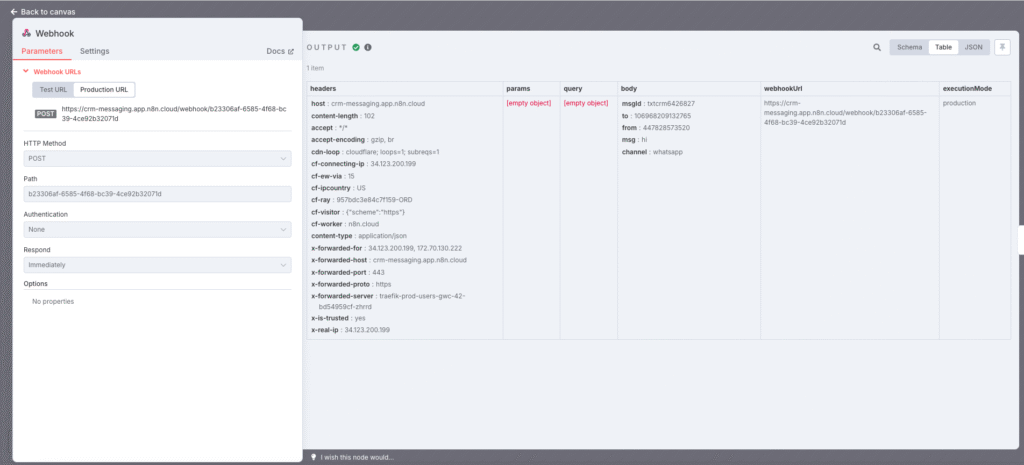
You can listen for incoming messages using the Webhook Node in n8n.
Steps:
- Drag the Webhook Node into your n8n workflow.
- Set:
- Method:
POST - Path:
incoming-message(or any custom name)
- Method:
- Copy the Production Webhook URL and go to CRM Messaging > Developer > Webhooks.
- Paste the URL in incoming and save.
✅ Now, when a message is received on your number, it will be pushed to this workflow in n8n.
📤 Send SMS / WhatsApp Action
The Send SMS / WhatsApp step allows you to send messages through CRM Messaging directly from n8n.
To use:
- Add an HTTP Request Node in n8n after your trigger.
- Choose:
- Method:
POST - URL: https://app.crm-messaging.cloud/index.php/Api/sendMsg
- Method:
- Use a Bearer Token authentication:
- Add your CRM Messaging API Token in credentials
- Send the following formdata in the body:
- to = {{ $json.body.from }} or use any other reference for to number
- msg = your sms content
- fromnum = {{ $json.body.to }} or use your other from number
Additionally, if your message has media attachments or is multilingual or your account has multiple phone numbers and channels then pass these additional optional parameters in form data in the API call
mediaUrl
fromnum
channel
lang
Here mediaUrl is the media attachment link
fromnum is from a phone number, it can be a WhatsApp phone number id in the case of WhatsApp or Long Code for SMS
channel is either whatsapp or SMS
lang is as per language saved in the template, you can find this code in template manager Text Messaging for Marketers and Sales Reps – CRM Messaging (crm-messaging.cloud) for eg. Pass en_US for English(US)
Here is helpful video – https://us06web.zoom.us/clips/embed/Z7xnNer1RmCi4hihXnvQpA
✅ This sends a WhatsApp message using CRM Messaging, triggered by your external CRM or tool.
Use Cases by CRM or Platform
| Platform | Example Use Case |
|---|---|
| HubSpot | Send WhatsApp after a lead submits a landing page |
| Zoho CRM | Send onboarding message when a lead enters “Engaged” stage |
| Salesforce | Send a reminder WhatsApp before a demo call |
| Lemlist | Trigger WhatsApp after cold email campaign gets a reply |
| Pabbly / Typeform | Send WhatsApp when a form is filled |
| Airtable / Notion | Trigger WhatsApp on new row or note |
| Make.com / Zapier | Bridge older CRMs to n8n if they lack webhook support |
Bonus Features You Can Add in n8n
- ✅ Add delay before sending WhatsApp
- ✅ Use Google Translate API to localize message
- ✅ Add conditional IF nodes to check location, product, etc.
- ✅ Store WhatsApp message status in Airtable/Google Sheets
- ✅ Trigger voice calls or emails as fallback if WhatsApp fails
Best Practices
- ✅ Always test with your own number first
- ✅ Include sender identity in message (as per WhatsApp policy)
- ✅ Do not send bulk WhatsApp from personal numbers—use the official WhatsApp API via CRM Messaging
- ✅ Keep track of usage inside the CRM Messaging dashboard
Tracking and Logs
Every WhatsApp message sent from n8n via CRM Messaging is logged in your CRM Messaging portal. You can:
- See delivery status
- Monitor cost (Meta conversation charges)
- View message history and reply tracking
Final Thoughts
If you’re using a CRM or platform without native WhatsApp automation, this setup is the most flexible, scalable, and affordable solution available.
By combining n8n’s no-code workflow engine with CRM Messaging’s robust WhatsApp API, you unlock a powerful system that can integrate with literally anything—without waiting for your CRM vendor to support WhatsApp.