 +1 302 486 0000
  +61 2 5129 0955
  +44 7828 573520
  +44 7828 573520
In today’s digital landscape, businesses thrive on fast, personal, and scalable communication. For small and medium enterprises, tools like Bigin by Zoho CRM offer an affordable, pipeline-focused CRM to manage leads, customers, and workflows. However, when it comes to messaging—particularly sending bulk WhatsApp messages—Bigin has its limitations out of the box.
Fortunately, the CRM Messaging for Bigin app bridges this gap, empowering users to Send Bulk WhatsApp and SMS from Bigin directly from their CRM. In this 2000-word guide, we’ll explore Bigin’s native messaging constraints, introduce the game-changing CRM Messaging solution, and provide a step-by-step process to master bulk WhatsApp and SMS campaigns in Bigin.
What is Bigin, and What’s Its Limitation with WhatsApp?
Bigin is a lightweight CRM from Zoho, tailored for small businesses with a starting price of $7/user/month. It excels at pipeline management, contact organization, and basic automation, making it a go-to for startups and solo entrepreneurs. Features like built-in telephony and email integration allow users to connect with customers efficiently—but there’s a catch when it comes to WhatsApp.
Out of the box, Bigin doesn’t natively support Send Bulk WhatsApp and SMS from Bigin. While it offers email and telephony options, WhatsApp—one of the world’s most popular messaging platforms with a 99.9% open rate—requires third-party integration for bulk outreach. Without an external tool, you’re limited to manual, one-off messages via your personal or WhatsApp Business app, which isn’t scalable or CRM-integrated. SMS capabilities in Bigin are similarly restricted, relying on external providers and lacking bulk functionality natively.
This limitation can hinder businesses that rely on instant, high-engagement channels like WhatsApp and SMS to reach customers. Enter CRM Messaging for Bigin, a powerful app available on the Bigin Marketplace that unlocks bulk WhatsApp and SMS messaging directly within your CRM.
Introducing CRM Messaging for Bigin
Available at marketplace.bigin.com/app/bigin/crm-messaging-for-bigin, CRM Messaging for Bigin is a third-party app designed to overcome Bigin’s messaging shortcomings.
Developed by CRM Messaging, a Delaware-based company, this tool integrates seamlessly with Bigin, enabling businesses to send bulk WhatsApp messages and bulk SMS to hundreds or thousands of contacts in one go. With this app, you can leverage WhatsApp’s unparalleled reach and SMS’s reliability, all while keeping your communication tied to your CRM data.
Why Bulk WhatsApp and SMS Matter
- Unmatched Open Rates: WhatsApp boasts a 99.9% open rate, and SMS follows at 98%, dwarfing email’s 20-30%.
- Instant Delivery: Reach your audience in seconds, not hours.
- Personal Touch: Use CRM data to customize messages for higher engagement.
- Scalability: Communicate with your entire contact list effortlessly.
Now, let’s dive into how you can overcome Bigin’s limitations and send bulk WhatsApp and SMS using CRM Messaging.
Step-by-Step Guide to Send Bulk WhatsApp and SMS from Bigin
Step 1: Set Up Your Bigin Account
To Send Bulk WhatsApp and SMS from Bigin, you’ll need an active Bigin account:
- Sign Up: Head to www.bigin.com and start with a free trial or paid plan.
- Add Contacts: Import your customer list via CSV, manual entry, or sync with Google Workspace/Office 365.
- Build Pipelines: Organize your sales or support processes to align with your messaging goals
Bigin’s simplicity ensures you’re ready to integrate advanced tools quickly.
Step 2: Install CRM Messaging for Bigin
Since Bigin lacks native bulk messaging, installing CRM Messaging for Bigin is your next step:
- Go to the Marketplace: Visit marketplace.bigin.com/app/bigin/crm-messaging-for-bigin.
- Install the App: Log in with your Bigin credentials and click “Install Now.”
- Grant Access: Authorize the app to connect with your Bigin data.
- Set Up: Configure initial settings to prepare for WhatsApp and SMS integration.
This app transforms Bigin into a messaging powerhouse, addressing its native WhatsApp and SMS limitations.
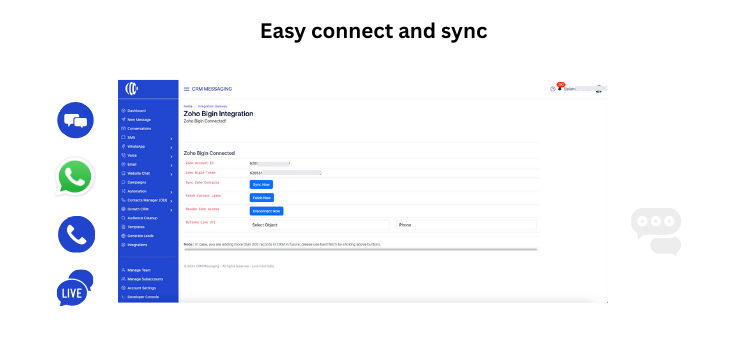
Step 3: Connect Your WhatsApp and SMS Accounts
To enable Send Bulk WhatsApp and SMS from Bigin, link your accounts:
- WhatsApp: Set up a WhatsApp Business API account, generate an API key, and input it into CRM Messaging settings. Ensure compliance with WhatsApp’s bulk messaging policies.
- SMS: Connect an SMS provider (e.g., Twilio, Nexmo) by entering your API credentials (SID, token, and phone number).
Once linked, Bigin becomes your centralized hub for bulk messaging.
Step 4: Segment Your Audience
Targeting the right contacts is crucial for effective bulk WhatsApp and SMS campaigns:
- Filter Contacts: Use Bigin’s filters to segment by pipeline stage, location, or custom fields.
- Create Lists: Group recipients into campaign-specific lists (e.g., “Prospects” or “Repeat Buyers”).
- Verify Data: Ensure phone numbers and names are accurate for personalization.
Segmentation maximizes relevance and response rates.
Step 5: Craft Your Message
With CRM Messaging, you can create impactful messages:
- WhatsApp: Write text, add emojis, links, or media (images, PDFs) using pre-approved templates for bulk sends or dynamic messages within the 24-hour window.
- SMS: Keep it short (160 characters max per segment) with a clear CTA.
Tip: Insert Bigin’s dynamic fields (e.g., “Hi [FirstName]”) for a personal touch.
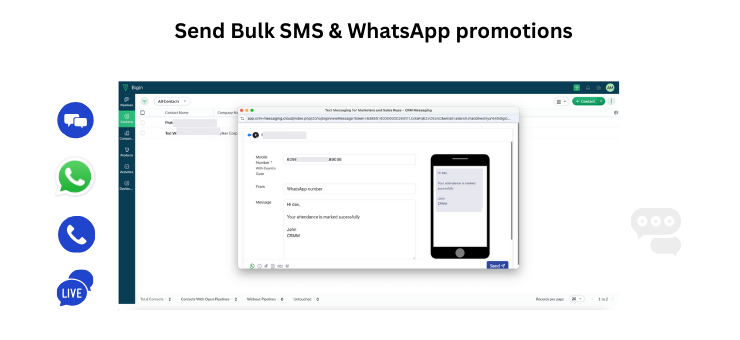
Step 6: Send Bulk WhatsApp and SMS from Bigin
Here’s how to execute your campaign:
- Access CRM Messaging: Open the app from Bigin’s sidebar or extensions menu.
- Choose Recipients: Select your segmented list or individual contacts.
- Write & Preview: Input your message and review it.
- Send or Schedule: Click “Send Now” or schedule for later.
The app handles bulk sends efficiently, saving you time and effort.
Step 7: Track and Analyze Results
Monitor your campaign’s success:
- Delivery Status: Confirm how many messages reached recipients.
- Engagement: Track WhatsApp read receipts or SMS link clicks.
- Replies: Log responses in Bigin for follow-ups.
Bigin’s analytics, enhanced by CRM Messaging, help refine your strategy.
Benefits of Send Bulk WhatsApp and SMS from Bigin
1. Overcoming Native Limitations
Bigin’s lack of bulk WhatsApp and SMS support is no longer a barrier with CRM Messaging, giving you full messaging flexibility.
2. Time Savings
Send messages to thousands of contacts in minutes, eliminating manual outreach.
3. Boosted Conversions
Personalized, instant messages via WhatsApp and SMS drive faster responses and higher sales.
4. CRM Integration
Every interaction is logged in Bigin, keeping your data unified.
5. Cost Efficiency
Leverage WhatsApp’s free messaging (within limits) and affordable SMS rates for budget-friendly outreach.
Best Practices for Send Bulk WhatsApp and SMS from Bigin
- Obtain Consent: Secure opt-ins to comply with regulations and build trust.
- Be Concise: Focus on key points and a strong CTA.
- Time Strategically: Send during recipients’ active hours.
- Test First: Preview messages to avoid errors.
- Follow Up: Use Bigin to nurture engaged contacts.
Use Cases for Bulk WhatsApp and SMS in Bigin
- Lead Nurturing: Send WhatsApp offers to warm leads.
- Order Alerts: Update customers via SMS on shipping status.
- Promotions: Announce discounts to your full list.
- Event Reminders: Share WhatsApp invites or SMS confirmations.
- Support: Reply to inquiries instantly.
Troubleshooting Common Issues
- Messages Not Sending: Verify API credentials in CRM Messaging.
- Poor Delivery: Check phone number accuracy and opt-in status.
- App Issues: Ensure you’re on a paid Bigin plan and email marketplace-sales@bigin.com for help.
Why CRM Messaging for Bigin Stands Out
Built by CRM Messaging, this app is a top pick on the Bigin Marketplace as of January 2025. It’s user-friendly, robust, and purpose-built to fill Bigin’s messaging gaps, making it ideal for bulk WhatsApp and SMS campaigns.
Conclusion: Unlock Bigin’s Full Messaging Potential
Bigin is a fantastic CRM for small businesses, but its native lack of bulk WhatsApp and SMS support can hold you back. With CRM Messaging for Bigin, you can break free from these limitations, reaching your audience instantly and effectively. Visit marketplace.bigin.com, install the app, and start sending bulk WhatsApp messages and bulk SMS today—your customers are waiting!
Book a Demo Now