 +1 302 486 0000
  +61 2 5129 0955
  +44 7828 573520
  +44 7828 573520
If you’re using Zoho Bigin, you already know it’s a lightweight, no-frills CRM built for small businesses. It’s simple, powerful, and helps teams stay organized.
But what if you could add WhatsApp, the most widely used messaging app in the world, directly into your Bigin pipeline?
With Zoho Bigin WhatsApp Integration, powered by CRM Messaging, you can communicate faster, automate lead engagement, and grow your business—without ever leaving Bigin.
This guide covers:
- What Zoho Bigin WhatsApp Integration is
- How to set it up
- The benefits of automating WhatsApp inside Bigin
- Real-world use cases for sales and support
Let’s dive in.
🔗 What Is Zoho Bigin WhatsApp Integration?
Zoho Bigin WhatsApp Integration connects your WhatsApp Business number directly into your Bigin CRM.
With this setup, you can:
- Send and receive WhatsApp messages within Bigin
- Auto-log conversations under each contact or deal
- Trigger automated messages when deals are created, moved, or closed
- Use templates for order updates, reminders, or promotional messages
CRM Messaging makes this process seamless by offering an official WhatsApp Business API and ready-made integration for Bigin.
⚡ Why You Should Connect WhatsApp to Zoho Bigin
Small businesses thrive on speed and personalization.
Here’s why Zoho Bigin WhatsApp Integration is essential:
- Instant Responses: Engage leads or customers within seconds.
- Higher Open Rates: WhatsApp messages get seen—unlike emails buried in inboxes.
- No Missed Opportunities: Every WhatsApp message is tracked, assigned, and managed inside Bigin.
- Multimedia Support: Send PDFs, invoices, images, and videos with ease.
- Faster Deal Closures: Fewer delays, more conversions.
Your team doesn’t need to jump between apps or struggle with follow-ups. WhatsApp becomes part of your CRM flow.
🛠️ How to Set Up WhatsApp Integration with Zoho Bigin (Using CRM Messaging)
Setting up Zoho Bigin WhatsApp Integration is easy with CRM Messaging.
Step-by-Step:
- Apply for WhatsApp Business API Access
CRM Messaging will guide you through number registration and profile approval. - Connect WhatsApp to CRM Messaging
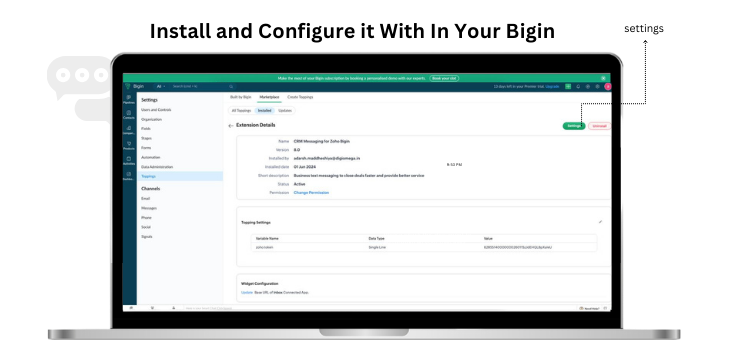
Configure your WhatsApp Business profile and messaging templates. - Install the CRM Messaging Bigin Connector
- Sync contacts, deals, and pipeline stages.
- Enable two-way messaging inside Bigin.
- Set Up Automations and AI Bots
- Trigger WhatsApp messages when a deal is created, updated, or moved.
- Use bots to handle FAQs, collect customer details, or schedule meetings.
- Go Live and Start Messaging!
All incoming and outgoing WhatsApp chats now flow directly through Bigin—with zero switching.
💼 Real Use Cases of Zoho Bigin WhatsApp Integration
Here’s how real teams are using WhatsApp in Bigin to win more business:
✅ Lead Qualification
New WhatsApp inquiries are automatically added to Bigin and qualified via bot—no manual entry needed.
✅ Instant Customer Support
Send how-to videos, PDF guides, or quick tips directly through WhatsApp when a customer raises a ticket.
✅ Appointment Booking
Automate WhatsApp messages to confirm demo calls or service visits using Bigin workflows.
✅ Payment & Renewal Reminders
Trigger WhatsApp alerts when a deal is in “Closing” or “Renewal Due” stages. Add payment links for instant action.
📊 Key Features with CRM Messaging + Bigin
| Feature | Benefit |
|---|---|
| Two-Way WhatsApp Chat | Message customers from within Bigin records |
| Automation Triggers | Send messages when deals change stage |
| AI Bots | Qualify leads, book appointments, answer FAQs 24/7 |
| Message Templates | Use pre-approved business messages (e.g., appointment reminders) |
| Bulk Messaging | Send promotions or updates to a filtered Bigin contact list |
| Analytics & Logs | Track response time, chat volume, and conversation success rates |
🔒 Secure and Compliant
CRM Messaging ensures your Zoho Bigin WhatsApp Business Integration stays compliant:
- End-to-end encrypted messages
- GDPR, CCPA-ready
- Role-based access and message logs
- Secure hosting with no data leakage
You get the speed of WhatsApp without compromising privacy or professionalism.
📈 What Businesses Are Saying
Companies using CRM Messaging + Zoho Bigin report:
- 40–50% increase in response speed
- 35% improvement in lead conversion
- 30% fewer missed follow-ups
- 20% growth in repeat customer engagement
Whether you’re in real estate, wellness, consulting, or eCommerce—this integration puts conversations at the heart of your CRM.
✅ Final Thoughts
Zoho Bigin WhatsApp Integration is a game-changer for small businesses looking to scale without complexity.
When you connect WhatsApp through CRM Messaging, you turn every message into an opportunity—and every chat into a customer moment.
It’s fast, secure, affordable, and fully integrated into the CRM you already use.
👉 Ready to do Zoho Bigin WhatsApp Integration the smart way?
📞 Book a Free Demo
✍️ Start Your Free Trial
CRM Messaging makes it easy to message, automate, and grow—all inside Bigin.