 +1 302 486 0000
  +61 2 5129 0955
  +44 7828 573520
  +44 7828 573520
Today’s customers want quick, seamless communication—and businesses using Zoho CRM know the value of fast, personalized interactions. If you’re still relying solely on emails and calls, you’re leaving opportunities (and revenue) on the table.
The solution? Zoho WhatsApp Integration.
By connecting WhatsApp to Zoho CRM through CRM Messaging, you can engage leads, nurture relationships, and close deals faster—right inside the CRM you already use.
In this complete guide, we’ll walk you through:
- What Zoho WhatsApp Integration really means
- Why businesses need Zoho CRM WhatsApp Integration
- How Zoho WhatsApp Business Integration helps boost sales and service
- How easy Zoho WhatsApp Set Up can be with CRM Messaging
Let’s dive in.
📱 What Is Zoho WhatsApp Integration?
Zoho WhatsApp Integration simply means connecting WhatsApp—your customers’ favorite messaging app—directly into your Zoho CRM dashboard.
Instead of switching between apps, your sales, marketing, and support teams can:
- Send and receive WhatsApp messages inside Zoho
- Track entire conversation histories
- Trigger automated workflows based on WhatsApp interactions
- Assign WhatsApp conversations to specific agents
- Use templates and quick replies to save time
Think of it as supercharging your CRM with the speed, ease, and familiarity of WhatsApp.
🚀 Why You Need Zoho CRM WhatsApp Integration
Today’s customers don’t want to wait for an email reply or sit through long calls. They want instant, casual, yet professional communication.
Here’s why Zoho CRM WhatsApp Integration is a game-changer:
| Benefit | Impact |
|---|---|
| Instant Lead Engagement | Capture and qualify leads faster with automated WhatsApp replies. |
| Centralized Communication | View every chat, note, and attachment right inside Zoho CRM. |
| Higher Response Rates | WhatsApp boasts 90%+ open rates—10x better than email. |
| Smarter Automation | Trigger follow-ups, reminders, and nurture campaigns via WhatsApp. |
| Better Team Collaboration | Assign conversations to sales reps based on region, stage, or product. |
| Full Customer Journey Visibility | Track chats alongside emails, calls, and notes for a 360° customer view. |
🌟 How Zoho WhatsApp Business Integration Boosts Your Sales and Support
Connecting WhatsApp Business API to Zoho CRM via CRM Messaging opens even bigger opportunities:
1. Automate Customer Support
Set up AI bots to instantly reply to common queries—order status, appointment booking, FAQs—while your team focuses on complex issues.
2. Send Personalized Campaigns
Use Zoho CRM filters to create targeted WhatsApp campaigns based on:
- Customer interests
- Buying behavior
- Past conversations
- Service history
Example: Auto-send payment reminders or promotional offers via WhatsApp to high-intent leads.
3. Speed Up the Sales Cycle
With instant messaging:
- Send quotes or invoices faster
- Handle objections in real time
- Nudge deals across the finish line without long gaps
Speed = Sales.
🛠️ How to Set Up Zoho WhatsApp Integration (The Easy Way)
Setting up Zoho WhatsApp Integration might sound technical, but it’s surprisingly easy when you use CRM Messaging.
Here’s a simple setup roadmap:
- Apply for WhatsApp Business API Access
(Don’t worry—CRM Messaging guides you through this.) - Connect WhatsApp to CRM Messaging
Set up your WhatsApp Business number inside the CRM Messaging platform. - Integrate CRM Messaging with Zoho CRM
- Install the CRM Messaging extension from Zoho Marketplace.
- Map your fields (leads, contacts, conversations) easily.
- Set triggers: for example, auto-message when a lead status changes.
- Set Up Templates and Bots
Pre-approve your WhatsApp templates for notifications.
Create bots to automate lead capture, appointment scheduling, or customer support. - Go Live!
Start messaging your leads, customers, and prospects directly from Zoho CRM.
CRM Messaging handles compliance (GDPR, WhatsApp policies) automatically, so you don’t have to worry about bans or penalties.
🎯 Best Practices for Zoho WhatsApp Set Up
To get the most from your Zoho WhatsApp setup, follow these tips:
- Get Clear Opt-Ins: Always collect explicit consent before messaging on WhatsApp.
- Use Personalized Messages: Leverage CRM fields like name, company, and lead score.
- Automate Follow-Ups: Set automated WhatsApp reminders after meetings, quotes, or support tickets.
- Segment Your Audience: Group leads and customers based on behavior and send targeted WhatsApp campaigns.
- Monitor Analytics: Track delivery rates, read rates, and reply rates to refine your messaging strategy.
With the right strategy, WhatsApp becomes your #1 channel for engagement and conversions.
🧠 Pro Tips for Best Results
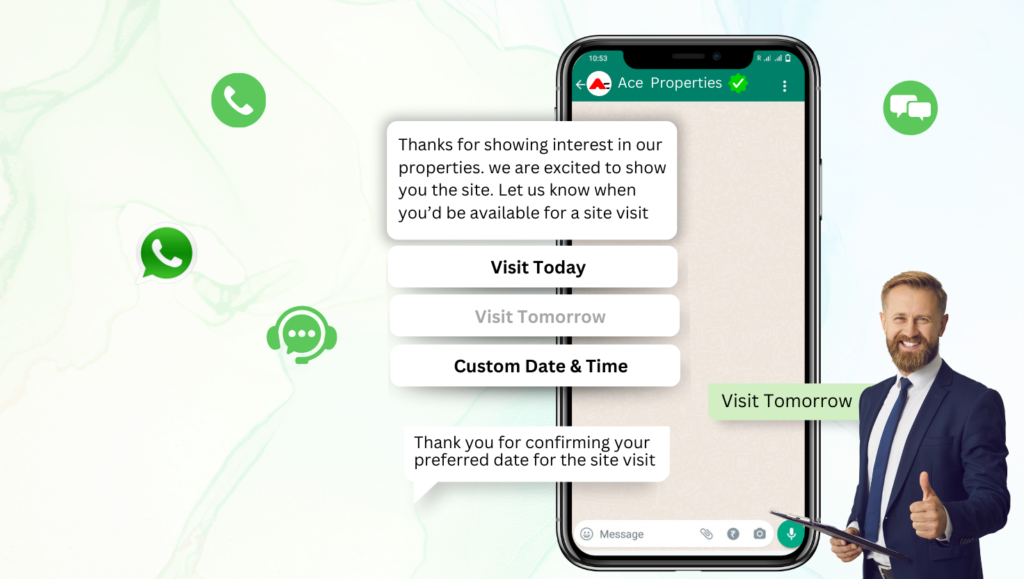
- Personalize Templates: Use CRM fields (like {First Name}) to make every WhatsApp feel personal.
- Use Quick Replies: Speed up handling common responses.
- Monitor Performance: Track open rates, response times, and agent productivity.
- Combine with Email/SMS: Create multi-channel sequences—start on WhatsApp, follow up via email or SMS if needed.
- Don’t Spam: Always get opt-ins and follow WhatsApp Business guidelines to maintain credibility.
📈 Real Business Impact of Zoho WhatsApp Integration
✅ 30–50% faster response times
✅ 40% higher lead conversion rates
✅ 25% boost in repeat business
✅ 20% reduction in customer churn
Across industries—real estate, education, e-commerce, healthcare, consulting—businesses are seeing real ROI with CRM Messaging’s Zoho WhatsApp setup.
🔒 Security, Compliance, and Peace of Mind
- End-to-end encrypted WhatsApp messaging
- GDPR, CCPA, and data protection compliance
- Audit logs for every conversation
- Secure cloud hosting with strict privacy controls
Your data—and your customer conversations—are safe.
Final Thoughts: Time to Make Your CRM Conversations Smarter
The world’s best customer conversations now happen on WhatsApp.
If your CRM doesn’t speak WhatsApp fluently, you’re already a step behind.
With CRM Messaging’s Zoho WhatsApp Integration, you can:
- Centralize communication
- Automate workflows
- Improve customer satisfaction
- Boost sales and revenue
All without adding chaos to your day.
👉 Ready to connect Zoho CRM and WhatsApp the smart way?
📞 Book a Free Demo
✍️ Start Your Free Trial
Let’s turn every conversation into a conversion—with CRM Messaging.